TL;DR: The Angular MCP server is built into the Angular CLI (v21+, including Angular 22). Run
ng mcpto get the config snippet for your editor, add it to.cursor/mcp.json(or your IDE’s equivalent) withnpx -y @angular/cli mcp, and your AI agent can query your workspace, readangular.json, fetch official best practices, and run context-aware migrations likeonpush_zoneless_migration. Setup takes about 5 minutes — jump to the setup steps.
We used to treat AI like a smart stranger. We would copy-paste error messages or file contents into ChatGPT, hoping it understood our project’s architecture. It was helpful, but it was blind.
With Angular 21, that stranger has moved into your house.
The release of the Angular CLI MCP Server (ng mcp) marks a fundamental shift in how we maintain applications. It isn’t just a new command; it’s a protocol that allows AI agents (like Cursor, Windsurf, or VS Code Copilot) to “interview” your project, understand your specific constraints, and run migrations that actually compile.
Here is why the “manual migration” era might be ending, and how to survive the new Agentic Workflow.
What is the Angular MCP Server?
The Angular MCP server is a Model Context Protocol server built directly into the Angular CLI (ng mcp), available since Angular 21 and expanded in Angular 22. It lets AI editors like Cursor, VS Code Copilot, and Windsurf connect to your Angular workspace: querying your project structure, reading the official documentation, and running migrations with real context instead of guesses.
MCP itself is an open standard that lets AI models connect to local tools and data — think of it as the “USB port” for AI:
Before MCP: You paste angular.json into the chat so the AI knows your file structure.
After MCP: The AI simply asks the Angular CLI, “Hey, list all the projects in this workspace,” and the CLI responds with the exact structure, build targets, and library dependencies.
Since Angular 21, the CLI is an MCP server. It exposes “tools” that your AI editor can call directly.
Setting It Up: 5 Minutes to “Agentic” Angular
The setup is surprisingly trivial because the Angular team baked it directly into the CLI.
1. Initialize the Server
In your Angular 21 workspace terminal:
ng mcpThis command doesn’t start a daemon; it generates the configuration snippets you need for your specific IDE.
2. Connect Your Editor (e.g., Cursor)
If you are using Cursor (which you probably should be if you’re interested in MCP), create or edit .cursor/mcp.json or if you are using Antigravity (which you probably should be if you’re interested in MCP), create or edit .gemini/antigravity/mcp.json in your project root:
{
  "mcpServers": {
    "angular-cli": {
      "command": "npx",
      "args": ["-y", "@angular/cli", "mcp"]
    }
  }
}
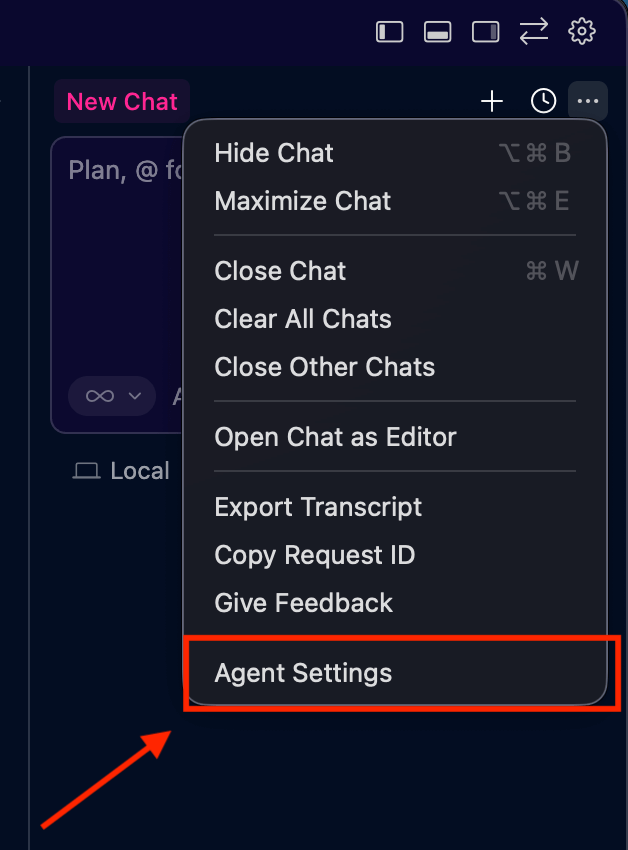
To double-check the CURSOR configuration, in cursor click in the three dots in the top right corner and select “Agent Settings.”
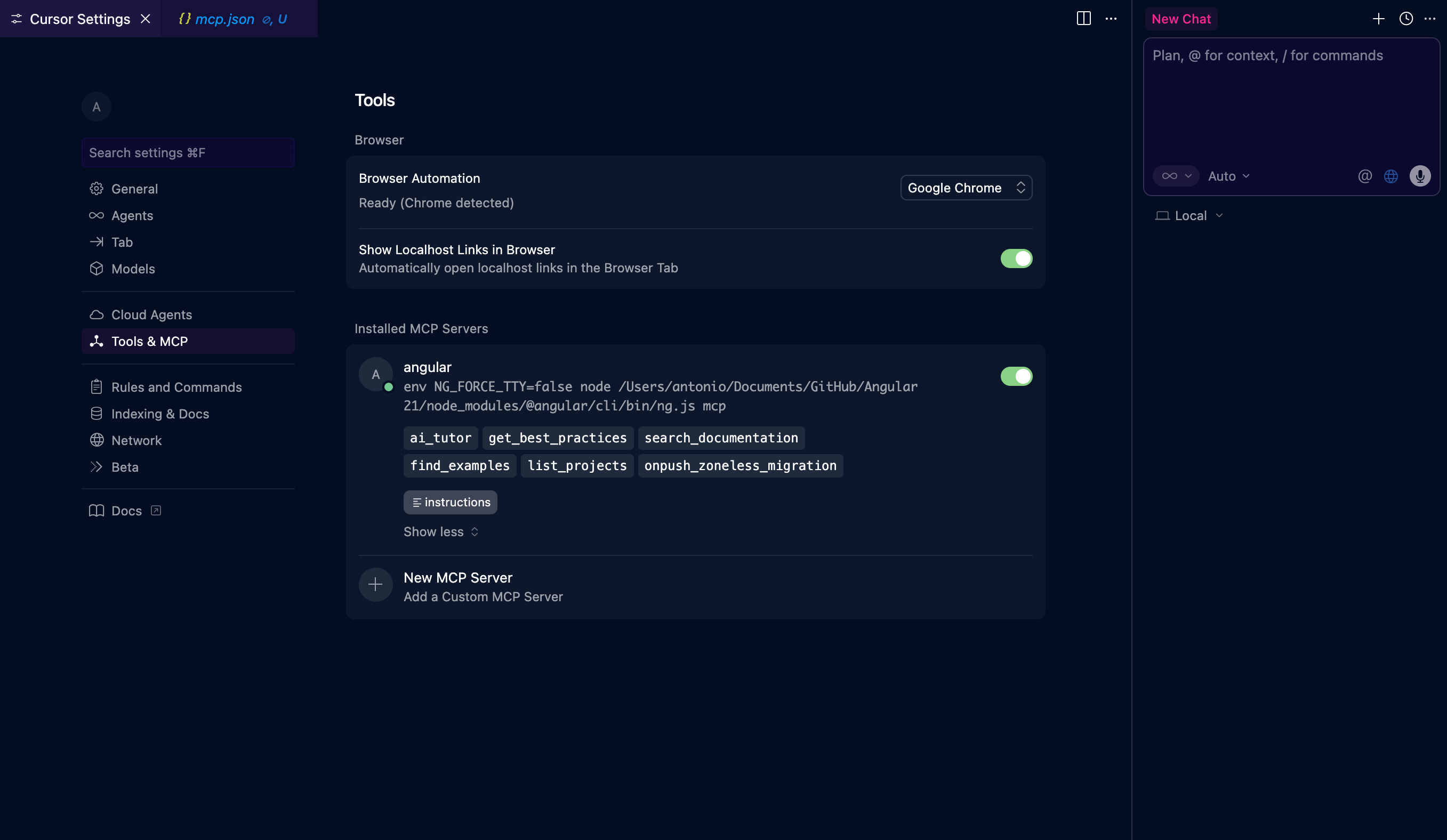
then click in “Tools & MCP.” if everything is configured correctly, you should see angular as installed MCP server listed with the name of the tool as “ai_tutor.”
To double-check the Antigravity configuration, in Antigravity click on the three dots in the top right corner and select “MCP Servers.”
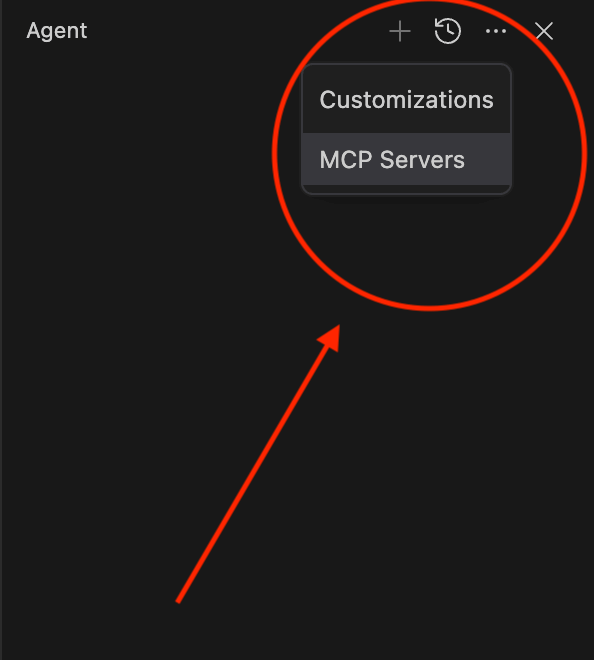
then you will see ‘angular-cli’ listed, and you can manage the tools, having the ability to enable or disable them.
[!NOTE] The
-yflag is crucial to prevent the “Press y to install” prompt from hanging the background process.
Available Tools
The Angular CLI MCP server provides several tools to assist you in your development workflow. By default, the following tools are enabled:
| Tool Name | Read-Only | Local-Only |
|---|---|---|
ai_tutor | ✅ | ❌ |
find_examples | ✅ | ❌ |
get_best_practices | ✅ | ❌ |
list_projects | ✅ | ✅ |
angular.json | ✅ | ✅ |
onpush_zoneless_migration | ✅ | ✅ |
search_documentation | ✅ | ❌ |
Experimental Tools
Some tools are provided in experimental/preview status. You can enable them explicitly:
| Tool Name | Read-Only | Local-Only |
|---|---|---|
modernize | ✅ | ❌ |
The “Killer App”: Context-Aware Migrations
Why go through this trouble? Because Context-Aware Migrations blow standard schematics out of the water.
Traditional ng update scripts are rigid. They follow a strict “If A, then B” logic. If your architecture is weird (and let’s be honest, every enterprise architecture is weird), the script breaks or produces code you have to rewrite.
The MCP Server exposes tools that change this dynamic:
Tool 1: get_best_practices
The AI can fetch the current Angular team recommendations. It won’t hallucinate that you should use SharedModule in 2025 because it “read it on a blog from 2021.” It asks the CLI for the ground truth.
Tool 2: onpush_zoneless_migration
This is the big one for v21. Instead of blindly changing ChangeDetectionStrategy.Default to OnPush, the AI uses this tool to analyze your dependency graph.
The Workflow:
You: “Hey, I want to migrate user-profile.ts to Zoneless. Check if it’s safe.”
AI (Internal Thought): I need to check the component style. I’ll call list_projects to find the root, then read the file.
AI (Internal Thought): I see an Observable subscription in ngOnInit. I’ll check get_best_practices for handling async in Zoneless.
AI (Action): “I detected an unmanaged subscription. In Zoneless, this won’t trigger a render. I recommend converting this user$ observable to a Signal using toSignal() before we switch the strategy.”
It doesn’t just apply a fix; it negotiates the refactor with you based on the framework’s internal logic.
Tool 3: search_documentation
The AI doesn’t need to guess API signatures. It queries the local offline documentation index provided by the MCP server.
Real-World Scenario: The “Legacy” Cleanup
Let’s say you have an Angular 17-style component using HttpClientModule (deprecated approach) and RxJS for simple state.
Prompt to Cursor (with MCP active):
“Refactor dashboard.component.ts to align with Angular 21 best practices. Use the get_best_practices tool to verify your plan first.”
What happens:
- The AI calls
get_best_practicesand learns thatstandalone: true,inject(), and Signals are the standard. - It calls
modernize(an experimental tool in v21) to run the standard schematics. - It manually cleans up the leftovers—converting
constructor(private http: HttpClient)toprivate http = inject(HttpClient). - It converts your
BehaviorSubjectstate tosignal.
The result is code that looks like it was written in v21, not just patched to run in v21.
The Future: Continuous Maintenance
This release signals a change in how Google views the CLI. It’s no longer just a build tool; it’s an interface for agents.
In the near future, we likely won’t “stop development” to upgrade. We will have a background agent running via MCP that opens PRs:
“I noticed you used a ControlValueAccessor here. I’ve created a PR to refactor this to the new Signal Forms input API.”
“Angular v22 just dropped. I’ve updated your angular.json and verified your tests via vitest.”
Summary: Don’t Upgrade Alone
If you are moving to Angular 21, do not just run ng update and fight the compile errors manually.
- Install the MCP server.
- Let the AI map your project.
- Ask it to plan the migration for you.
The code is still your responsibility, but the grunt work? That belongs to the machine now.
If you want to know more about how to structure your AI agents, check out my article on MCP Skills vs MCP Tools: The Right Way to Configure Your Server to understand when to use standard tools vs procedural playbooks.
